Electronic Document Archive
Automate archiving business processes with a versatile system of storing electronic documents which guarantees a safe, controlled, managed store, easy search, and processing of any kind of document format
- A file plan over cases and volumes, with a retention term on each
- Destruction and transfer that leave a signed report
- Full-text search across any document format
Document electronic archive
The system provides a structured storing of electronic documents, minimizes spending on paper archive support, makes impossible the document loss or damage risks, and increases company efficiency of a document flow processing
Full functionality in one system
-
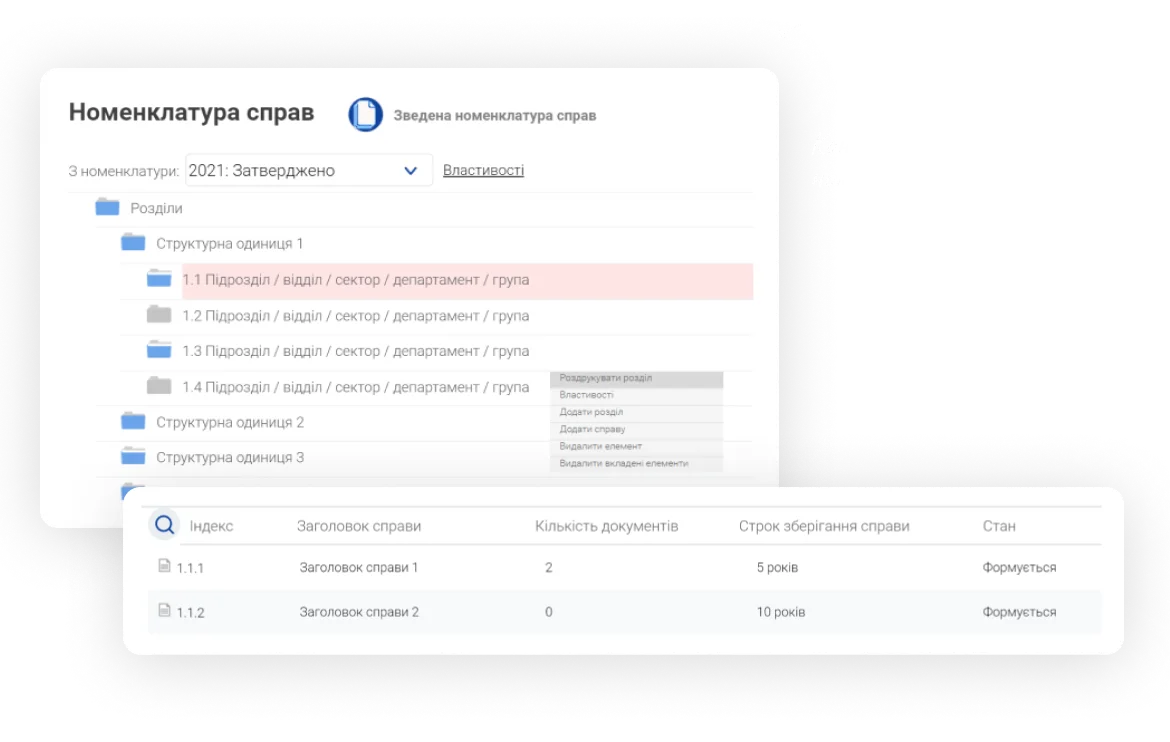
File plan designer
Build the file plan and design how documents are stored across divisions, with a retention term set on every case. The same plan drives what our document archiving software does with the documents later.
-
File plan approval
Storage structure is not only reliable, it is agreed: the file plan goes through approval by the responsible employees before it governs anything, and every later change goes the same way.
-
Electronic cases and volumes
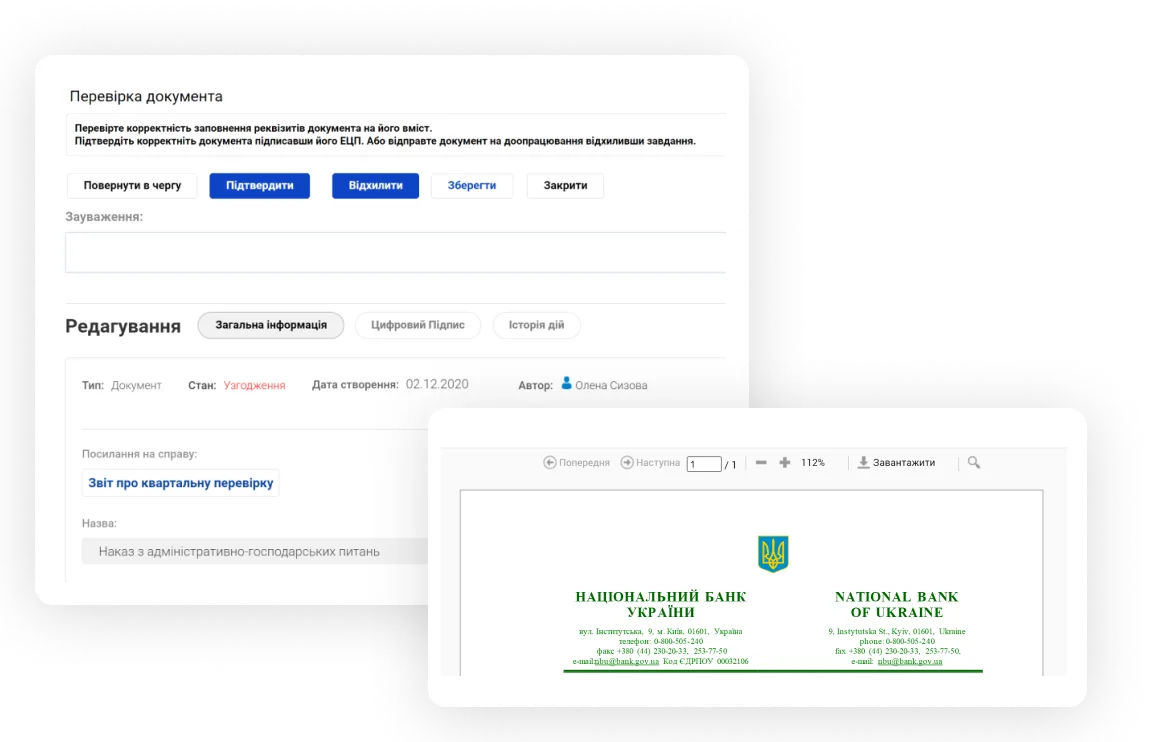
Ability to make cases and volumes with later fill them with documents. The system allows you to automate processes of document withdrawal and return from cases, and their closing as well
-
Cases numbering designer
Flexible options for configuring case numbering according to the company's approved rules
-
Transitional case volumes
Ability to make and fill the transitional case volumes of different periods according to the company storing rules
-
Document registration to archive
Ability to download and register documents from various sources: digitized paper documents and documents from the other systems, with a digital signature in particular
-
Processes of issuance and return
Flexible document managing options: automated document withdrawal and return by the requests (name, issuing date, expected return date, and monitoring)
-
Case descriptions
Add the information a case needs for structured storage and later search: the division that owns the documents, the retention term, the responsible person, the year of the file plan it belongs to, and so on.
-
Reception and issuance register
The record-keeping register keeps all the major necessary information about document movement, storing, and responsible for the document persons
-
Acts
Acts of elimination or transfer
-
Action audit and operation registry
Automated saving of user actions in the system (user action and action time)
-
QES support
Thanks to the ability to connect the document signing service using the digital signature, you can create a complete legally significant document and visualize the signature
-
Search and filtering
A flexible and multifunctional search allows you to quickly find the necessary documents while configuring filters allow you to get a required result
-
Full-text search
A full-text search allows you to quickly and easily find any documents, cases, and volumes by their content
-
PDF/A long-term format
The support of transforming documents into an unchangeable format (PDF/A) for long-term storing
-
Publishing documents to archive
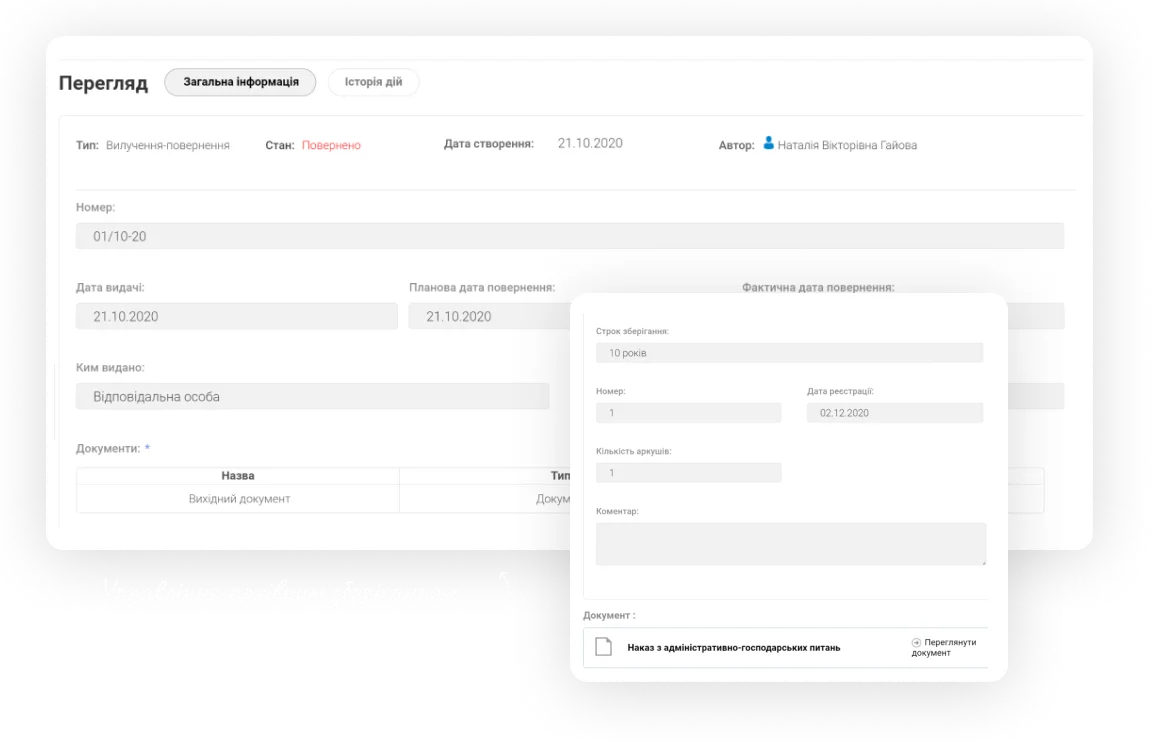
Publish documents to the archive with ease, by web-client tools or by integration mechanisms of any of your company information systems
-
Document scanning
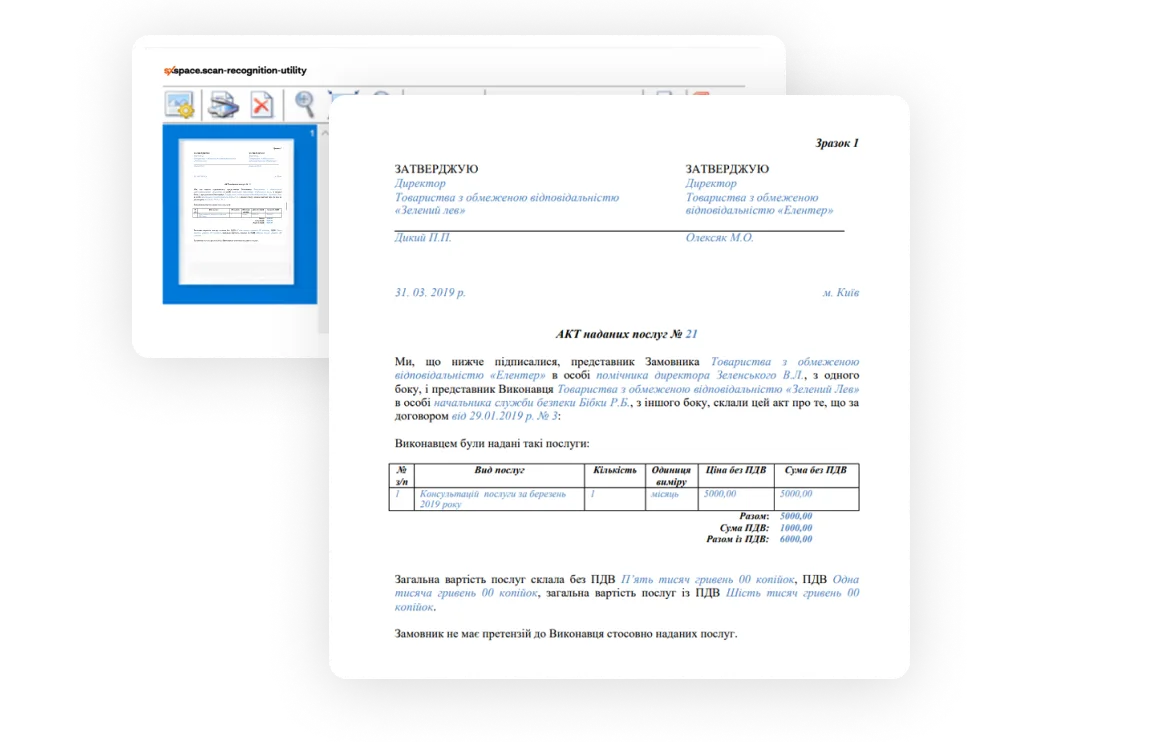
Automated scanning of paper documents thanks to the support of stream scanning, printing bar/QR codes, and importing electronic documents to the archive
-
Substitution and delegation
Configuring an automated task delegation to the assistant and substitution for temporarily absent employees
-
Localization
Support of multilingual user interface (UA, EN, PL, GE), setting of various user-preferred interface languages
-
Easy user interface and adaptive design
A systematized representation of information in a standard user interface, a unified cards design, all elements are always in the usual place. Ability to the full-fledged work from a mobile or any other devices, adaptive design for different screen sizes. Ability to enlarge the working zone or turn on a fast document card preview
-
Adaptation under the corporate style
User interface customization and the ability to complete adaptation under the company’s brandbook with a function of individual configuration of representation and product outlook (logo, colors, fonts, etc.)
-
Roles model and security policy
Downloading the group and role model from external systems, syncing with the company’s LDAP or Active Directory dictionaries. Configuring the access rights matrix by organisational structure, by role, or by the file plan. Every access is written to the log.
-
Administrating
It is possible to configure role models, access policy, dictionaries, and other elements for a convenient work
-
Analytical reports
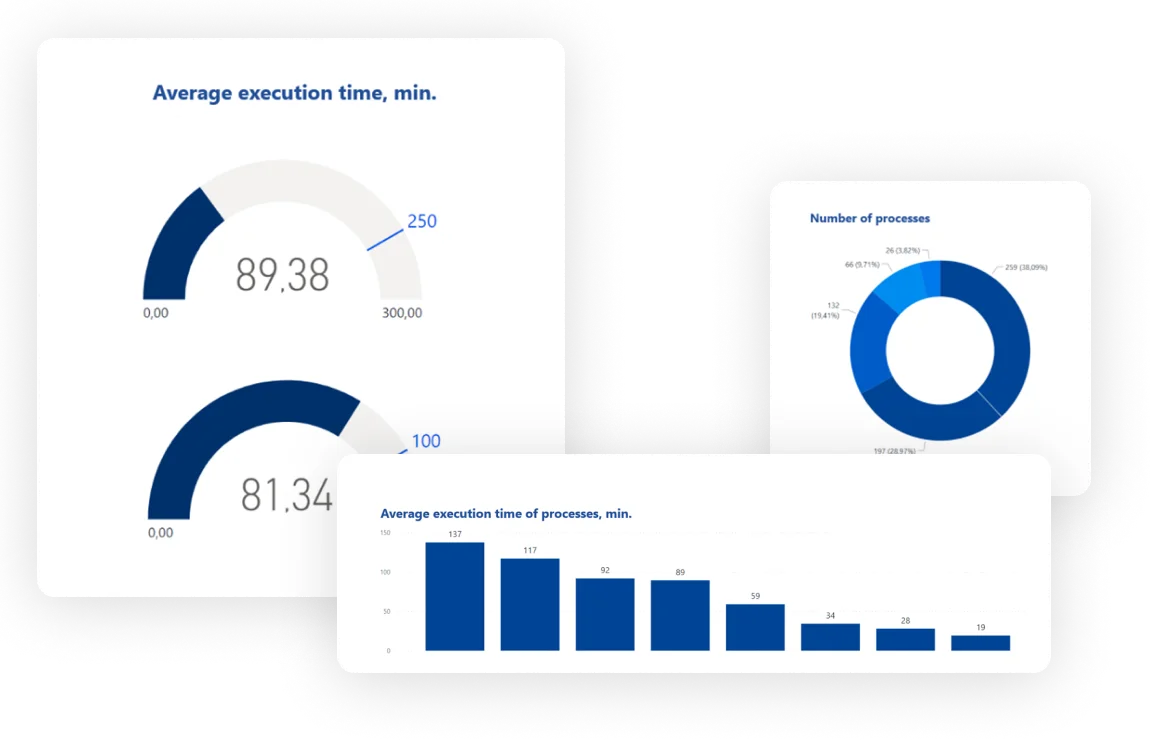
Reports on the archive's own activity: what came in, what was issued and returned, what is due for destruction and what was destroyed under which rule.
Why does the softXspace Archive?
-
Time and resources saving
The system consolidates all company’s documents into a single digital space, provides a convenient and efficient company operation, and minimizes financial costs due to the reduction of labor costs for personnel, costs saving on office spaces, and archiving equipment
-
Security
The system guarantees a safe processing and reliable storing of information and documents on the cloud or company’s server that allows you to avoid confidential data leaks. Thanks to the ability to connect the two-factor authorization, be sure that access to information will be available to only the company’s employees
-
24/7 access
Provide permanent access for users at any time and from anywhere. The system guarantees an uninterrupted and efficient operation for any company’s management body and perfectly fits banks and financial companies, large industries, holdings, and public institutions
-
Risks reduction
A significant simpleness to managing operations and holding meetings of collegial bodies, monitoring of execution, and as a result, a reduction of risks while executing resolutions. Thanks to the easy function of execution deadlines monitoring, you can provide appropriate control and increase execution discipline
-
Standardization and monitoring
Due to standardized processes of all operation procedures, you can forget about errors while making or supporting your important business documents. Configure standard approving routes, work with templates of the typical documents, which got legal expertise, and provide compliance with regulations and all established procedures. Provide 100% resolution executions thanks to the term monitoring and on-time performance of work duties. Be assured that documents are moved through all required approval and signing stages
-
Quick setup and implementation
The ease of product customization allows you to quickly implement it in the company, adapt it to corporate processes and standards, and develop additional necessary functionality. We can also provide solutions for integration tasks, training and detailed product documentation, quality warranty, and service support
Connect integrations
Six ways the archive connects to what you already run.
-
softXspace platform
With the help of the softXspace platform capabilities, you can transform your everyday routine work, automate processes and create a modern information space in a short time with minimal costs. Our Low Code tools for the personal development of business processes without programming will allow you to quickly build individual forms, cards, and many more
-
softXspace product line
You can quickly integrate our ready-to-go products with a document workflow system, contract automation, procurement management, etc. Powerful open API (REST, SOAP, a full-fledged CMIS standard implementation) allows you a rapid integration of the product into the company information space
-
Third-party systems
Establish a unified integrated IT infrastructure due to the ability to combine the product with third-party systems: ERP, ECM, DMS, internal portals, The ability to integrate with acounting systems and CRM (Dynamics 365, SAP, Salesforce), automated banking systems, or other systems that support integration abilities
-
Cloud and online services
Ability to integrate with Microsoft 365 services (Outlook, Teams, OneDrive, SharePoint, Microsoft Exchange, Word, Excel, Power BI, etc.), Google (Drive, Document, Gmail, Calendar, Meet, etc.). Integration with services of electronic signing, online sites of legally significant document workflow, counterparty verification services, etc.
-
Document signing services
Provide a full-fledged legally significant document workflow thanks to the integration of document signing services (use keys of most popular Ukrainian TSP, Diia Sign, digital signature service (DSS), Adobe Sign, DocuSign, and others). Ability to net/cloud storing of keys and rich functionality of signatures visualization
-
Scan and recognition module
Our scan&recognition module allows you to implement the functionality of text recognition from scanned documents of any format, the ability to search by the text content of scanned documents, stream scanning directly into the system, and processing of QR and bar codes
Our clients
Modern universal bank
World’s leading steel company
Ukrainian Commercial Bank
Ranks second in the TOP-20 most reliable banks in Ukraine
World's leading sunflower oil producer and Ukraine's top agricultural exporter
The largest Greek bank with 4.5 million customers, named Best Bank in Greece 2025
International mining and metals company, one of the largest companies in Central and Eastern Europe
One of the leaders in the banking system of Ukraine

One of the largest manufacturers, processors and traders of agricultural products
One of the leading banks in the Republic of Kazakhstan
One of the largest exporters of crude oil and by-products of sunflower processing from Ukraine
Part of the Procredit Holding AG group of companies (Germany)
Dutch multinational financial group, leader in corporate banking across Europe
The first internal IT service center in the public sector of Ukraine
TOP-3 among pork producers in Ukraine
Development, manufacture, installation and maintenance of equipment for the gas industry
One of the leaders of the national confectionery market
One of the largest commercial banks with Ukrainian capital operating on the domestic financial market
See it on your own documents
Plan an individual demonstration and see how archiving runs on your own documents: the file plan, the terms, the disposal evidence and the access log. Book a 30-minute demonstration of the archive. We run it on your own file plan and your own retention terms, not on a sample database.
- Your categories of cases, with the terms you actually have to keep
- Destruction and transfer shown end to end, report included
- On your own servers or in Azure in your region
What’s new?

How to Archive a SharePoint Site Without Losing the Rules
How to archive a SharePoint site: what Microsoft 365 Archive does, the four options available, and why retention is a separate decision from storage.

Document Lifecycle Management: Six Stages, One Owner Each
Document lifecycle management explained: the six stages a document passes through, who owns each one, and where handovers between them usually break.

Document Version Control: Rules That Survive Real Work
Document version control explained: why file names fail, what check-out and a version history actually give you, and how to keep one authoritative copy.
How to Write a Document Retention Policy That Holds
How to write a document retention policy: what goes in it, how long to keep things, who signs disposal, and the mistakes that make a policy unusable.
What Is Document Archiving? File Plans, Terms, Disposal
Document archiving explained: what it is, how it differs from document management, and what a document archiving system has to do with terms and disposal.
Digital HR Document Management for the Largest Retail Chain
How the largest Ukrainian retail chain Avrora digitized HR document workflows with softXspace – QES, ERP integration, 1300+ stores.
Banking Processing Automation and Centralisation
Streamline your banking operations with soft Xpansion's Low-Code/No-Code solutions. Manage documents, automate lending processes, optimize board meetings, and centralize data storage with eArchive and Back Office modules.
Document Management on a modern Low-Code/No-Code platform
Low-Code/No-Code platform for enterprise process automation offering solutions like contract management, document handling, centralized eArchive, B2B collaboration, and integration with CRM, ERP, and other services. Features include automated workflows, template-based document creation, and digital signatures