Document Management Software for Government
The full life cycle automation of classic document management for state authorities, local governments, and enterprises with similar business processes (registration of the incoming appeals, task management, execution monitoring, creation and approval of the outgoing documents, internal correspondence, etc.)
Our webinar
1h 2min
We will send a link to your email
Electronic document management system for government agencies
Turns paper document management into an electronic one, that saves a lot of time and resources, reinforces control at every document processing stage, simplifies the interaction between employees and provides 24-hour secure access to the necessary data anywhere and from any device
Full functionality in one system
-

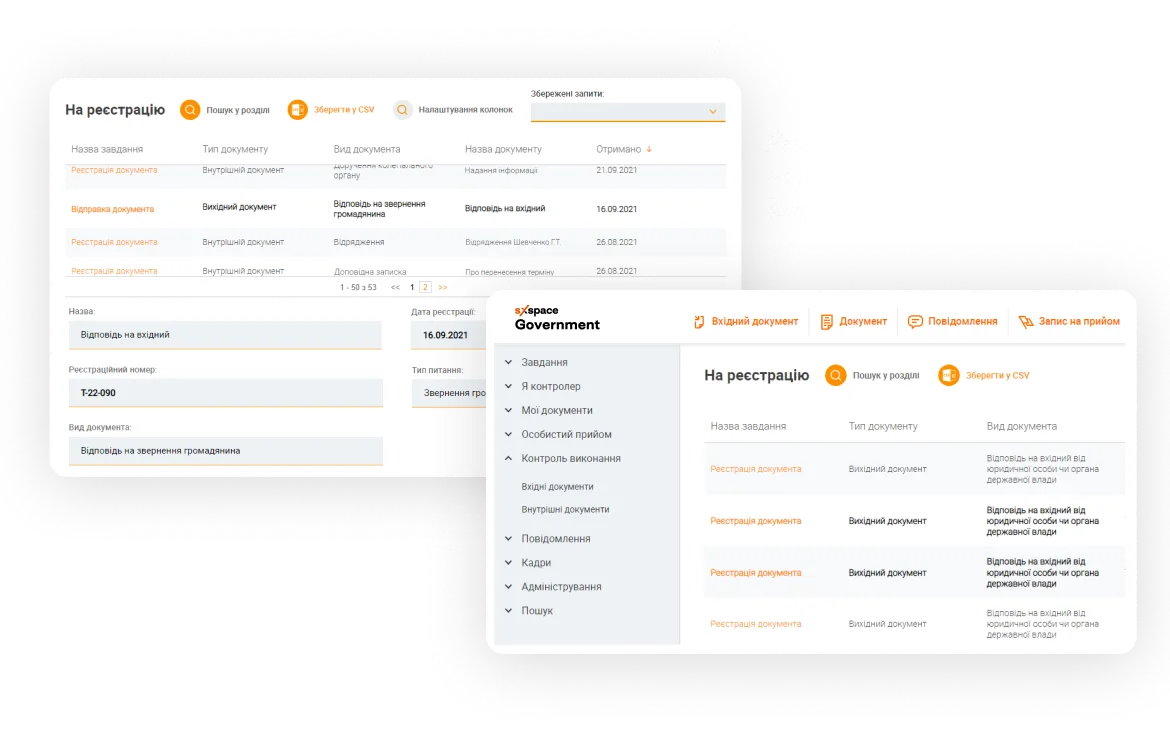
Documents database
24-hour access to all documents from any device and any place that have an Internet connection. You can create, approve, and sign the document, establish and perform tasks, or just view necessary information at the appropriate time
-

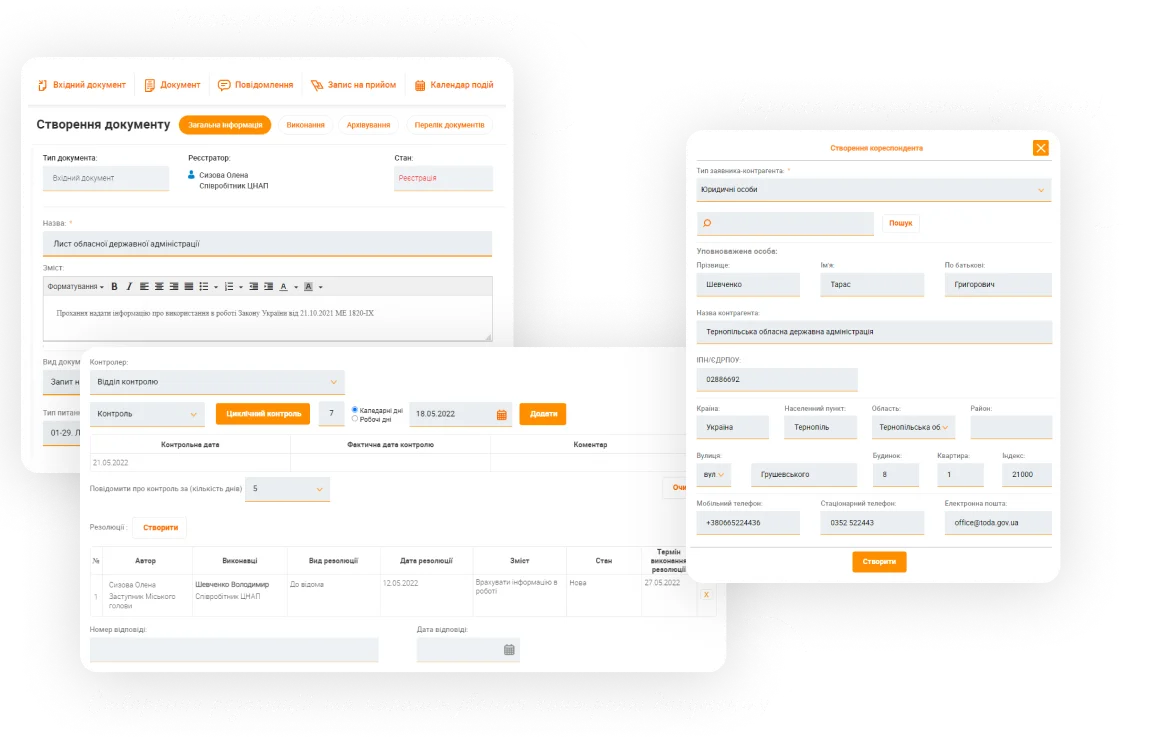
Counterparty registry
The register stores all information about each counterparty, details of legal entities and personal data of individuals. You can get here such contact information as addresses, delegate or contact person phones, etc.
-

Web access
The system does not require the installation of any additional software to get started with. It is possible to work full-fledged just by authorizing the system from your favorite browser on a PC, tablet, or smartphone
-

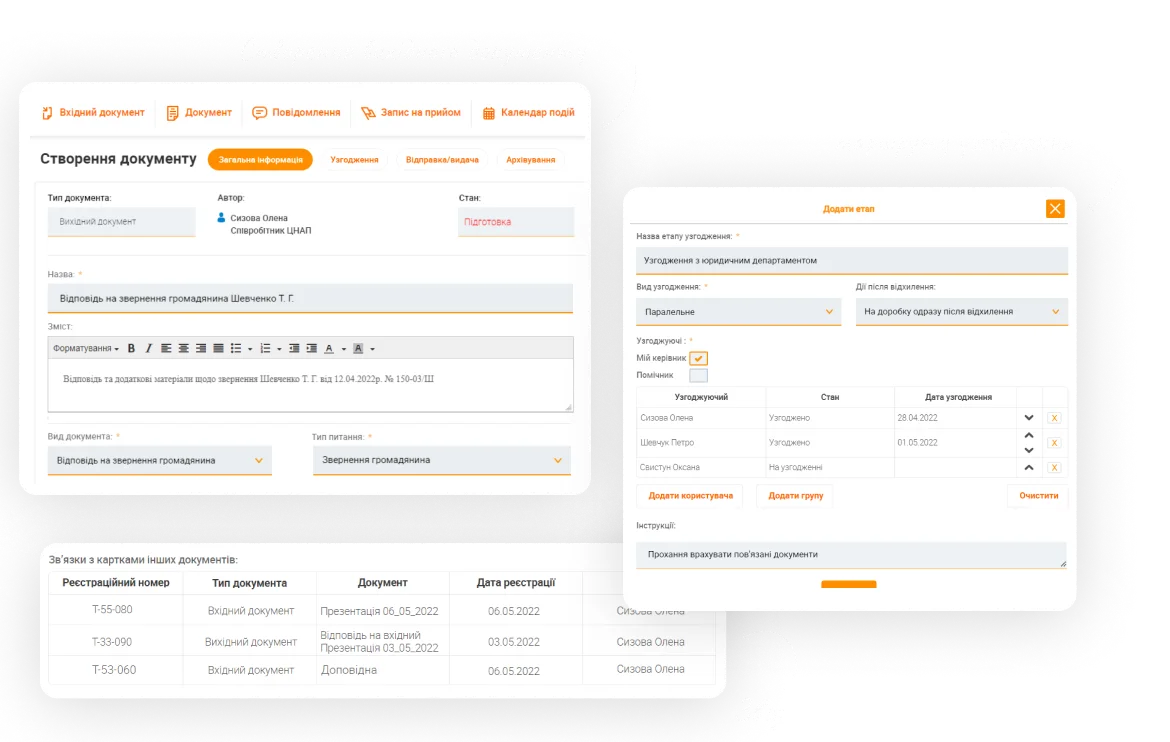
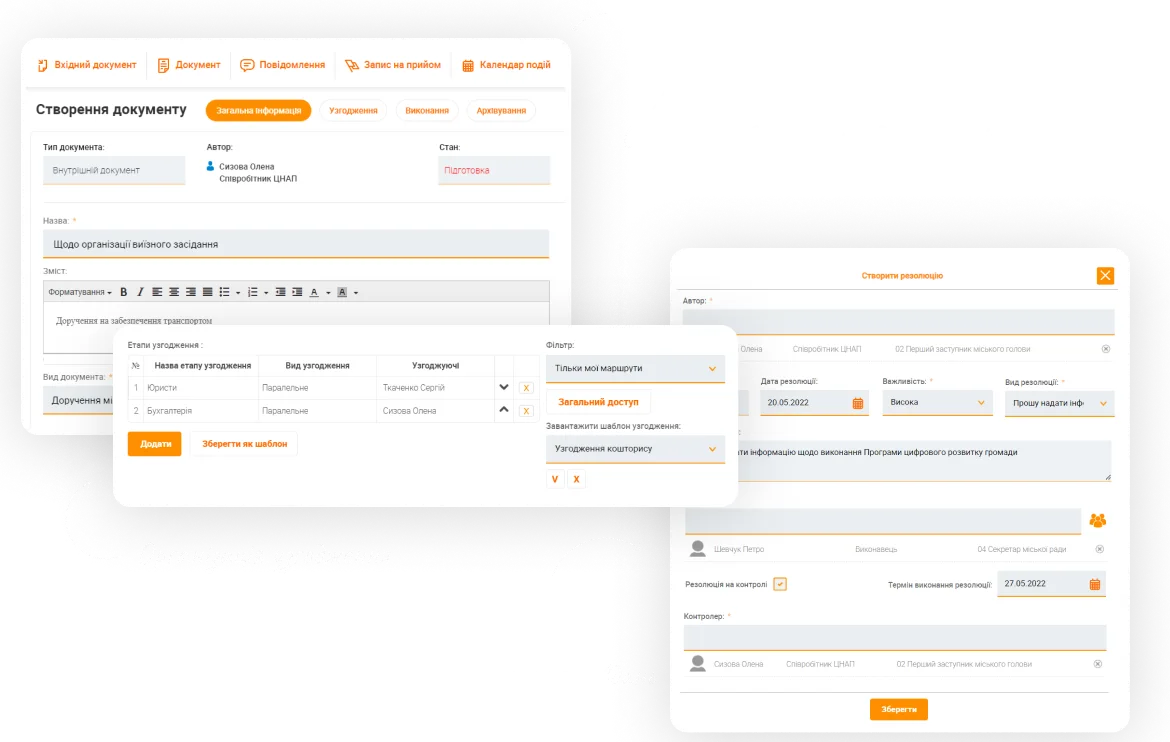
Approval
Setting up a staged sequential or parallel approval with required instructions for action in case of refusal. A flexible designer allows you to choose by different ways approvers, set action queues, and save approval routes as templates
-

Tasks
Multi-level delegation of tasks, the simultaneous appointment of separate tasks and/or several executors. The ability to quickly set the task to division or employees' group, and to review operatively execution of all tasks on document
-

Execution monitoring
Setting up control over the execution of individual tasks and the document as a whole allows you to control document processing time and task execution terms efficiently. There is also a possibility present for early reminders about upcoming control
-

Cyclic control
The ability of cyclic control over the terms from a single day to year allows you to monitor repeated tasks. For example, monthly or quarterly reporting, periodical informing, etc.
-

Substitution and delegation
Settings for automatic delegation of tasks to an assistant and substitution of temporarily absent employees
-

Automatic registration
Automatic generation of the registration number of the document. Due to the preconfigured numbering rules, you can set a high-level complexity definition of registration numbers (using document card attributes, dates, and logic conditions)
-

Collaboration on document
A teamwork on document, with the ability to online editing and commenting
-

Document versioning
Ability to save all versions of the document while working on it. Thus, provides access to the required document version with no need to search for the necessary revision in the mail, on the desktop, or be forced to create it from scratch
-

Document preview
View a text document straightway in the system without having to download it
-

Additional attachments
Ability to attach to the main document an unlimited number of any format applications
-
Downloading as PDF
Automatic conversion of a text document to be able to download it as a PDF file
-

Events calendar
The calendar may contain information about conferences, meetings of the executive and advisory bodies, councils, committees, holidays, internal events (training, seminars, lectures), birthdays, etc.
-

Meetings establishment
Easy planning of any meetings, provided with the place, date/time of holding, and reserving needed material resources. Determination of the required participants and automatically sending them an invitation. Recording the results and appointment of responsible for resolutions execution
-

Reminders and notifications
Employees receive notifications about new task assignments and reminders about execution control, so as not to miss important terms. This highly increases employees’ self-control and simplifies management
-

Administrating
It is possible to configure role models, access policy, dictionaries, and others for a convenient work
-

History and action audit
Detailed recording of each change of the document status and preservation of the global history of actions on documents and users
-

Role access
An easy setting of available system functions for different user groups. For example, the heads and specialists will have access to separate system functions
-

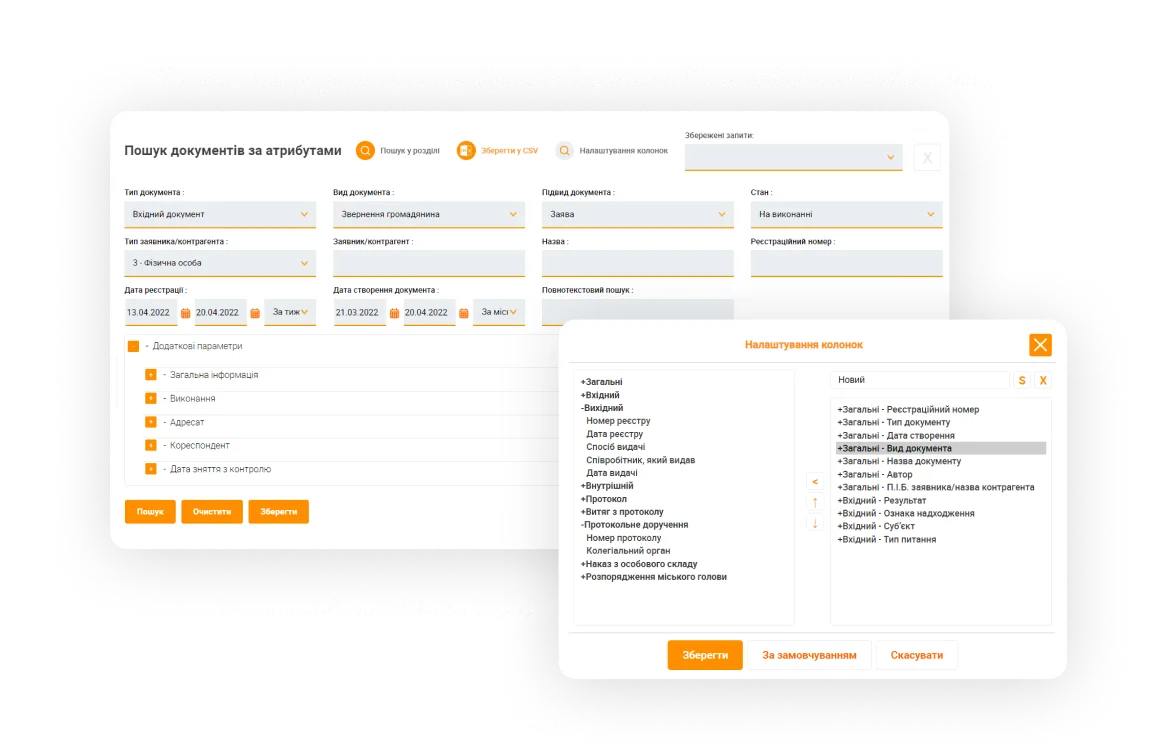
Analytics and reporting
Generate your own information-analytical reports by the documents, export reports to Excel, and use the dashboard to visualize the data and understand the key indicators of activity, efficiency, employees' workload, etc.
-

Dictionaries setting
The ability to configure most system dictionaries on your own: document kinds, forms and types of arrival, appeal subjects, user groups, etc.
-

Backing up of dictionaries
Ability to dictionaries export and import, which allows you to bravely experiment with their settings (anytime restoring) and provides keeping of different archived data copies
-

User profile
A user can customize the appearance of the workspace and change the access password on his own
-

Personnel module
Visualization of the organizational subordination of structural divisions/groups and the user card index
-

Easy user interface and adaptive design
A systematized representation of information in a standard user interface, a unified cards design, all elements are always in the usual place. Ability to the full-fledged work from a mobile or any other device, adaptive design for different screen sizes. The ability to enlarge the working zone or turn on a quick document cards preview
-

Scan and recognition
It is possible to install the scan&recognition module for scanning and recognition, which allows you to implement the functionality of text recognition from scanned documents of any format, the ability to search by the text content of scanned documents, stream scanning directly into the system, and processing of QR and bar codes
-

Adaptation under the corporate style
User interface customization and the ability to adaptation under the company’s brand book with a possibility of individual configuration of representation and product outlook (logo, colors, fonts, etc.)
Why does the softXspace Government?
-

Time and resources saving
Automation provides a significant reduction in document processing time, a reduction of up to 50% in operating losses, a 30% reduction in administrative expenses, reduction of financial risks due to delays. The time for approval and signing of documents is reduced from 2-3 weeks to 1 hour. Besides, the system works only by web access, that allows you to easily support it in personal infrastructure or host it on external data centers, making savings on your own resources and technical support
-

Interaction and communication
The product allows you to work with documents anywhere and anytime, have full access to files 24/7, provides the ability of teamwork and document online editing, that assists remote employees operations and interaction simplification of employees from different divisions
-

Free platform
The system is built over the softXspace platform, which allows you to implement it on a completely free stack of server products (OS, DB, application server, and development tools). This will provide a low cost of system ownership and extremely low overheads on connecting new users
-
Procedures standardization
Due to standardized processes of all operation procedures, you can forget about errors while processing documents, and provide 100% resolution executions thanks to the term monitoring and on-time performance of work duties. Be assured that documents are moved through all required approval and signing stages
-

Data security
The system has a G2 guarantee level and meets the requirements for DSTU-4145-2002. Reliable storing of documents in the cloud allows you to avoid leakage of confidential data and get access at any convenient time. The system has clearly described users rights and provides confidential access to the documents
-

Setup and implementation
The ease of customization allows you to quickly implement it in the company, adapt it to internal rules, corporate standards, local legislation. We can also provide solutions for integration tasks, training and detailed product documentation, quality warranty, and service support
Connect integrations
-

softXspace platform
With the help of the softXspace platform capabilities, you can transform your everyday routine work, automate processes and create a modern information space in a short time with minimal costs. Our Low Code tools for the personal development of business processes without programming will allow you to quickly build individual forms, cards, and many more
-

softXspace product line
You can quickly integrate our ready-to-go products with a document workflow system, contract automation, procurement management, etc. Powerful open API (REST, SOAP, a full-fledged CMIS standard implementation) allows you a rapid integration of the product into the company information space
-

SEIEB
Ability to connect to the System of Electronic Interaction of Executive Bodies (SEIEB), which aims to automate document workflow and establish a unified information space for the registration, reception, analysis, and store of organizational and administrative documents of the executive authority bodies in electronic form using QES
-

Third-party systems
Establish a unified integrated IT infrastructure due to the ability to combine the product with third-party systems: ERP, ECM, DMS, internal portals, The ability to integrate with acounting systems and CRM (Dynamics 365, SAP, Salesforce), automated banking systems, or other systems that support integration abilities
-

Cloud and online services
Ability to integrate with Microsoft 365 services (Outlook, Teams, OneDrive, SharePoint, Microsoſt Exchange, Word, Excel, Power BI, etc.), Google (Drive, Document, Gmail, Calendar, Meet, etc.). Integration with services of electronic signing, online sites of legally significant document workflow, counterparty verification services, etc.
-

Microsoft products
Integration with all Microsoft 365 solution infrastructure (Outlook, Teams, OneDrive, SharePoint, Word, Excel, Power BI, etc.), Azure Active Directory, and the ability to full integration in the company’s IT landscape based on Microsoft products
-

Document signing services
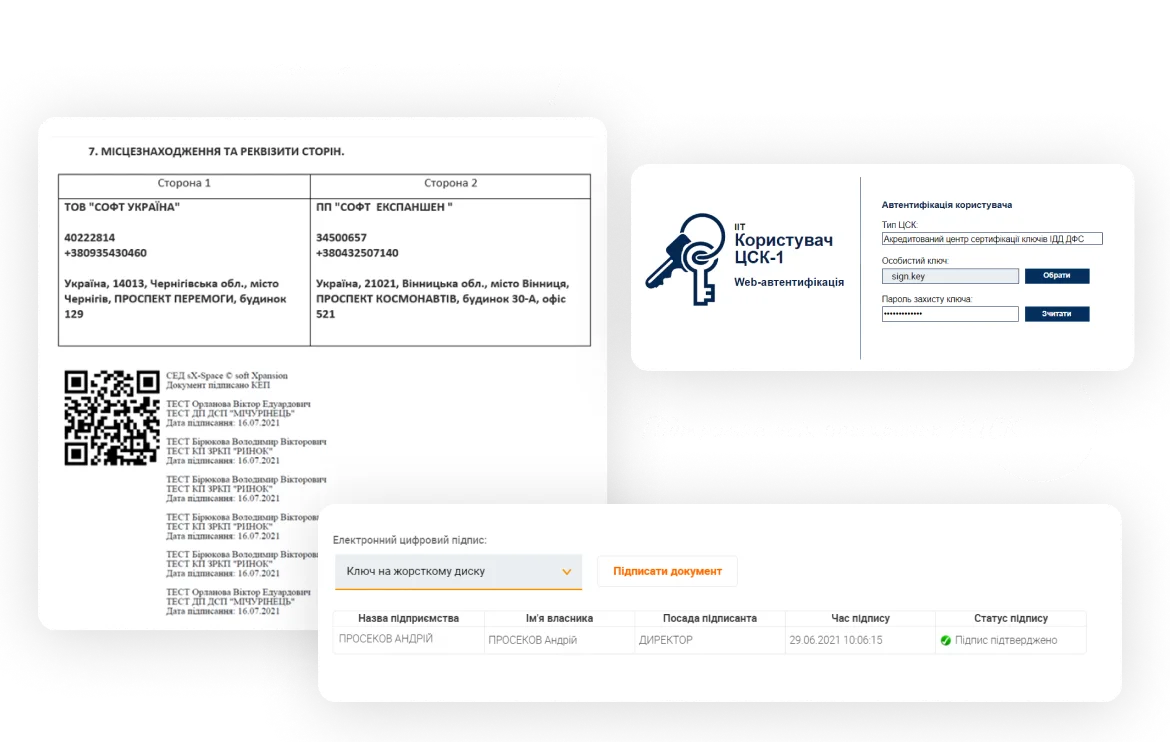
Provide a full-fledged legally significant document workflow thanks to the integration of document signing services (use keys of most popular Ukrainian TSP, Diia Sign, digital signature service (DSS), Adobe Sign, DocuSign, and others). Ability to net/cloud storing of keys and rich functionality of signatures visualization
-

Scan and recognition module
Our scan&recognition module allows you to implement the functionality of text recognition from scanned documents of any format, the ability to search by the text content of scanned documents, stream scanning directly into the system, and processing of QR and bar codes
Our clients

The first internal IT service center in the public sector of Ukraine
Forms and implements state policy in the field of digitalization

Forms and implements state policy in the field of fuel and energy complex

Local self-government body

Local self-government body

Local self-government body

Local self-government body

Local self-government body

Local self-government body

Local self-government body

Local self-government body

Defends and lobbies ATC interests at the regional and local levels throughout Ukraine

We will send a link to your email
Start now
Ask for an individual product demonstration right now and learn how you can quickly pass from the paper document workflow to the electronic one. Our implementation expert will tell you about all key features and product functionality by demonstrating real use cases
What’s new?
Digital HR Document Management for the Largest Retail Chain
How the largest Ukrainian retail chain Avrora digitized HR document workflows with softXspace – QES, ERP integration, 1300+ stores.
Banking Processing Automation and Centralisation
Streamline your banking operations with soft Xpansion's Low-Code/No-Code solutions. Manage documents, automate lending processes, optimize board meetings, and centralize data storage with eArchive and Back Office modules.
Document Management on a modern Low-Code/No-Code platform
Low-Code/No-Code platform for enterprise process automation offering solutions like contract management, document handling, centralized eArchive, B2B collaboration, and integration with CRM, ERP, and other services. Features include automated workflows, template-based document creation, and digital signatures
Document Management and Process Automation for Microsoft 365
softXspace365 offers a comprehensive solution for automating business processes within Microsoft 365. Features include a digital workspace, no-code process automation, document management with templates and archiving, task tracking, and seamless integration with tools like DocuSign.
Digital Contract Management with Counterparties in 9 Weeks
Automate your contract workflows and earn more! In 9 weeks get a turnkey solution: contract management, B2B portal, and EDI connectors.
softXspace365 – Document management and process automation for your Microsoft 365
How our product, softXspace365 for Microsoft 365, will help you easily and quickly automate processes and build a digital workspace

Merry Christmas and a Happy New Year 2024!
On the occasion of the bright celebration of Christmas and the approaching New Year, we sincerely want to congratulate you on these joyful holidays!
Automated Document Management: Transforming Business Efficiency
In the digital world, manual document management can be time-consuming, error-prone, and expensive.