Company Intranet Portal
A unified information space for the company employees’ teamwork, internal services life-cycle business processes automation, and aggregation of all employee’s tasks in a single window

We will send a link to your email
Corporate Portal
Allows to combine of all the elements of the corporate information, simplifies employees’ work, creates a single window for using other company’s resources, and increases information security
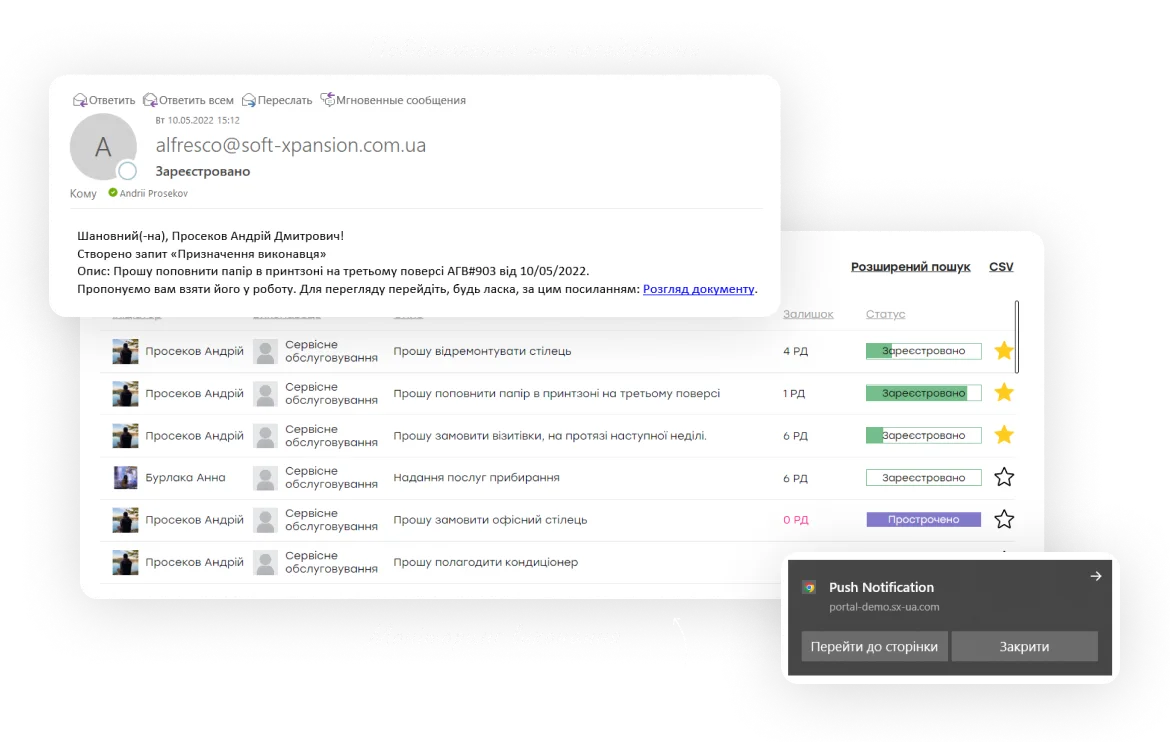
Full functionality in one system
-

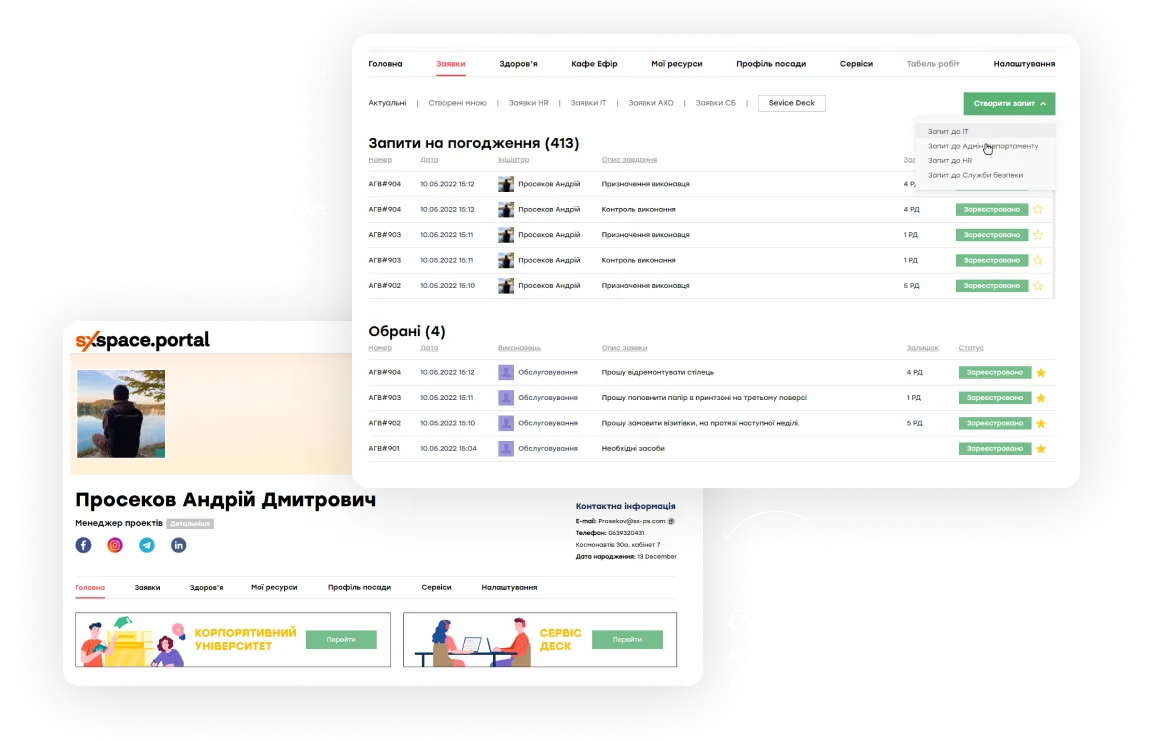
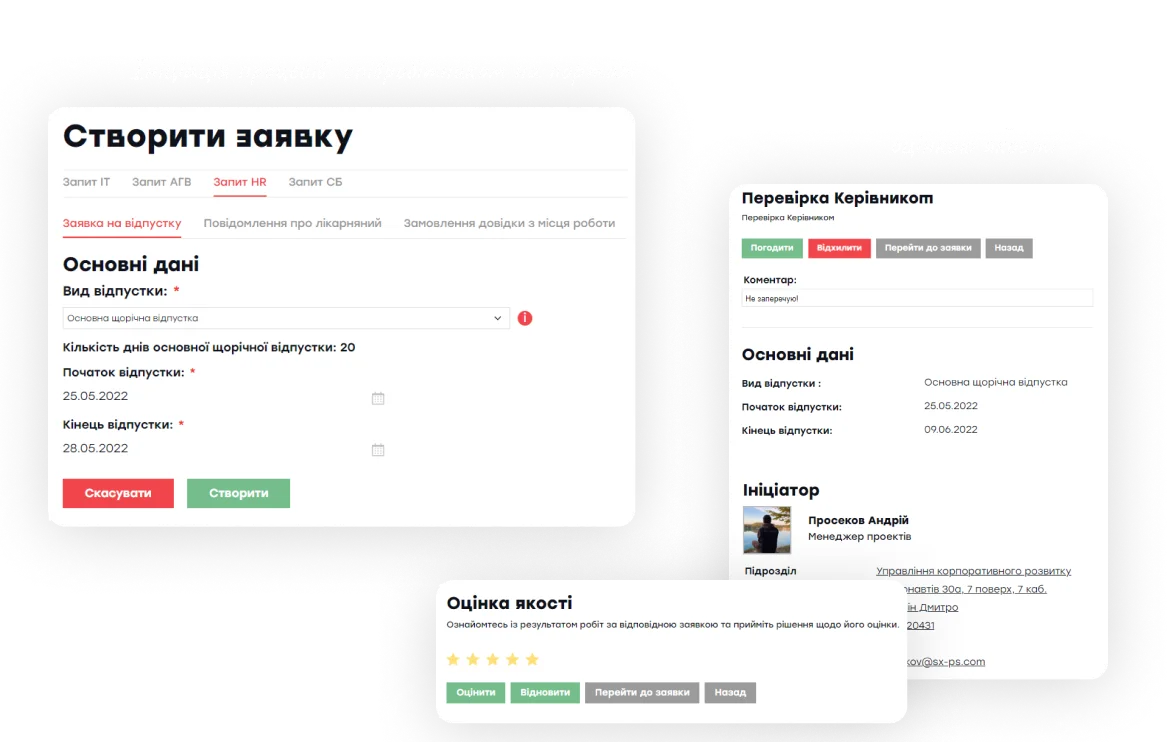
Creating and processing employees’ tasks
Permanent access to the creation and processing of various requests in the system (HR, SD, IT). Requests are processed with unified routes that provide the possibility of fast operating and saving the working time of employees
-

Aggregation of all employee’s tasks
A single window operating for aggregation and processing of user tasks that are created on the portal or by the company's external and internal systems
-

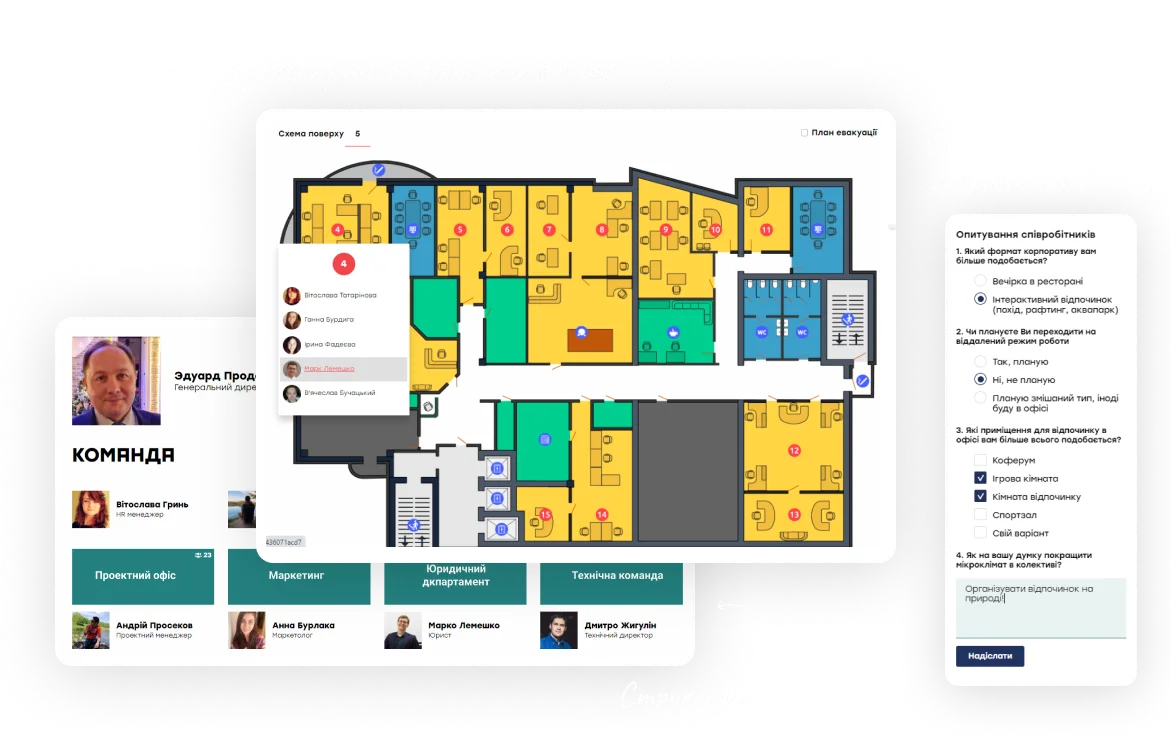
Office map
Visualization of employees' location by rooms, floors, and offices with the possibility of searching by a certain employee
-

Company structure
Visual representation of the company's detailed structure, which contains information about the head, employees, and division quantitative composition. Possibility of integration with internal HR systems
-

Corporate activities calendar
Plan corporate company events that will be displayed on the calendar of all employees
-

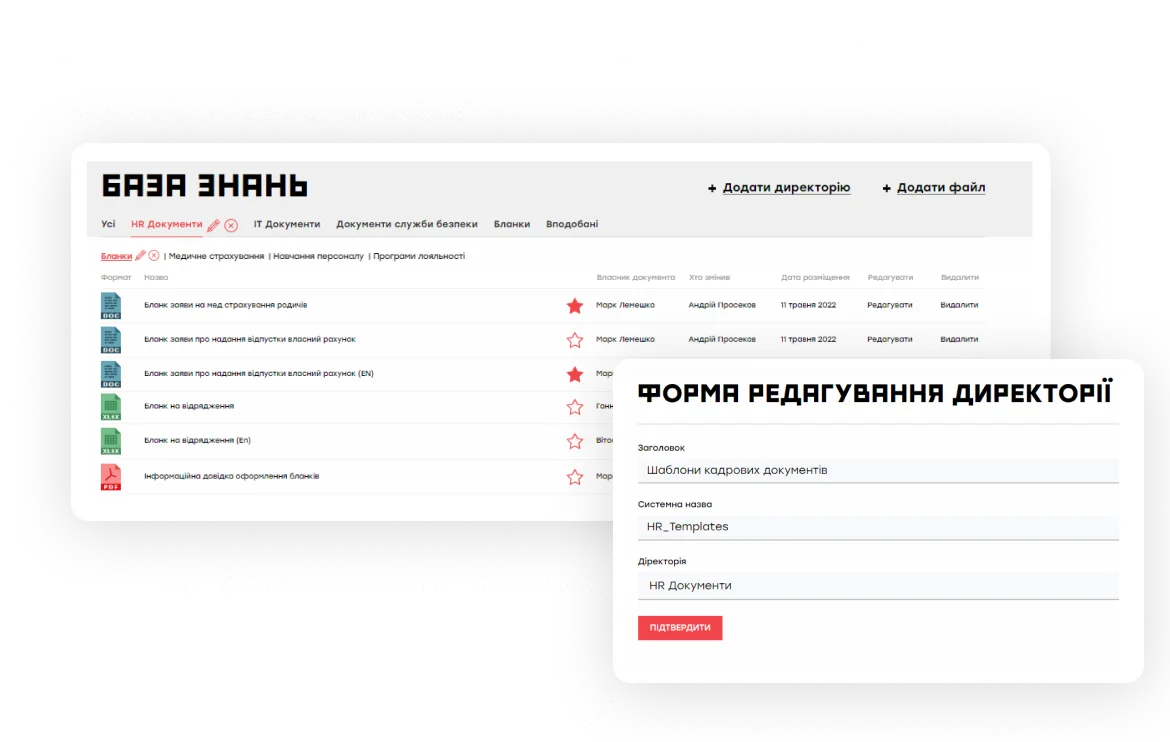
Knowledge base
Permanent access to all document templates, guides, video, audio, photos, and other required for user work information
-

Survey designer
Conduct surveys of any complexity, with the ability to manage the question types (open/closed questions) and customize the answer options. Based on the survey results, a report is generated with response statistics and the possibility of visualization
-

Reminders and notifications
Automatic e-mail or push notifications about important events in the system: publication of new information, receipt of a new task, approaching control date, need to perform a certain action
-

Work time table
Fill out the working timesheet directly in your personal account and send it to your manager for approval
-

Monitoring of business processes and tasks
Visual representation of the company's detailed structure, which contains information about the head, employees, and division quantitative composition. Possibility of integration with internal HR systems
-

Requests routes autodefinition
The system on its own detects business route, depending on kind or other request options
-

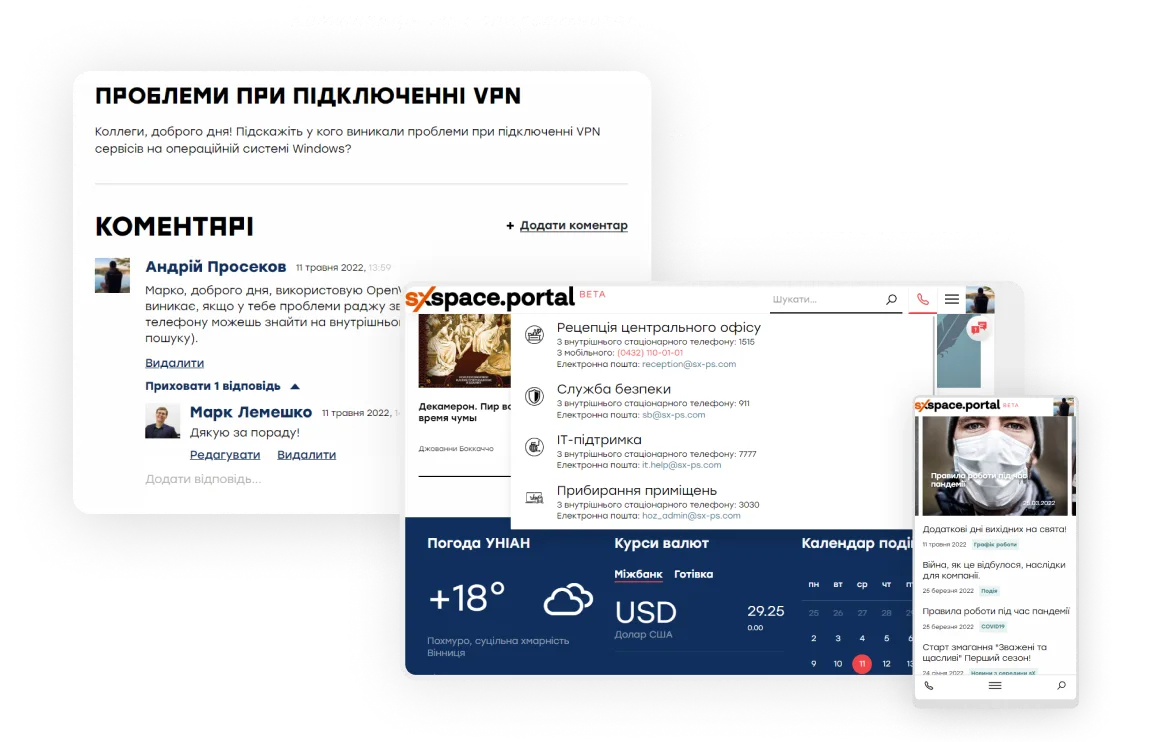
Collaboration
User ability to publish announcements, comments, and likes, and also conduct surveys by administrators among the employees
-

Multifunctional search
Search by all information resources available to the user, sites, employees, offices, and company structure, as well as full-text and attributive search by the Knowledge base and by requests
-

History of requests processing
Complete information about request processing is saved, including timestamps for left comments
-
Excel export
Ability to export the requests registry, survey results, search and filtering results for later processing in Excel
-

Google Analytics
Thanks to the connection of Google Analytics, the collection of detailed information on user behavior, tracking of views and popularity of individual pages and sections of the portal, as well as the generation of reports is ensured
-

Cloud hosting
Hosting a system and storing the data in the cloud environment allows you to avoid confidential info leaks and gives you access at any convenient time
-

Administrating
It is possible to configure role models, access policy, dictionaries, and others for a convenient work
-

Handy interface and adaptive design
Systematized information representation in a standard interface, unified card design, all required controls are always in the usual place. Ability to fully operate with mobile and any other devices, adaptive design for different screen sizes
-

Content management system (CMS)
Ability to create pages by your own (without coding), fill and edit content by using provided interface elements
-

Integration capabilities
Regarding to the opened API system has the ability to integrate with other systems that support integration tools
-

Brand book adaptation
User interface customization and the ability to complete adaptation under your brand book with the options of configuring an individual representation and product exterior
-

Localization
Support of multilingual user interface (UA, EN, PL, GE), setting of various user-preferred interface languages
-

Analytics and dashboards
System tools allow you to generate template reports, configure personal dashboards and analyze the data
Why does the softXspace Corporate Portal?
-
Interaction and communication
The ability to work in a unified information space from anywhere and anytime helps in operating conveniently and interacting between employees of different divisions and remote employees in particular
-
Information support for the employees
A quick and easy tool for conveying important information to employees and receiving feedback from them
-

Time and resources saving
Automation helps you to reduce operation time in many times, and reduce operational costs and financial risks due to delays
-

Safe store and 24/7 access
The system guarantees a secure processing and safe store of information and documents with 24/7 access by cloud or self-hosting, that helps to avoid confidential data leaks. Thanks to the ability to connect the two-factor authorization, be sure that access to information will be available to only the company’s employees
-

Quick setup and implementation
The product supports centralized and local deployment: it could be installed both in the cloud and in your company's infrastructure or build hybrid solutions. The ease of product customization allows you to quickly implement it in the company, adapt it to corporate processes and standards, and quickly develop additional necessary functionality
-

Procedures standardization
Procedure standardization allows you to forget about errors in processing the requests
Connect integrations
-

softXspace platform
With the help of the softXspace platform capabilities, you can transform your everyday routine work, automate processes and create a modern information space in a short time with minimal costs. Our Low Code tools for the personal development of business processes without programming will allow you to quickly build individual forms, cards, and many more
-

softXspace product line
You can quickly integrate our ready-to-go products with a document workflow system, contract automation, procurement management, etc. Powerful open API (REST, SOAP, a full-fledged CMIS standard implementation) allows you a rapid integration of the product into the company information space
-

Third-party systems
Establish a unified integrated IT infrastructure due to the ability to combine the product with third-party systems: ERP, ECM, DMS, internal portals, The ability to integrate with acounting systems and CRM (Dynamics 365, SAP, Salesforce), automated banking systems, or other systems that support integration abilities
-

Cloud and online services
Ability to integrate with Microsoft 365 services (Outlook, Teams, OneDrive, SharePoint, Microsoſt Exchange, Word, Excel, Power BI, etc.), Google (Drive, Document, Gmail, Calendar, Meet, etc.). Integration with services of electronic signing, online sites of legally significant document workflow, counterparty verification services, etc.
-

Microsoft products
Integration with all Microsoft 365 solution infrastructure (Outlook, Teams, OneDrive, SharePoint, Word, Excel, Power BI, etc.), Azure Active Directory, and the ability to full integration in the company’s IT landscape based on Microsoft products
-

Document signing services
Provide a full-fledged legally significant document workflow thanks to the integration of document signing services (use keys of most popular Ukrainian TSP, Diia Sign, digital signature service (DSS), Adobe Sign, DocuSign, and others). Ability to net/cloud storing of keys and rich functionality of signatures visualization
Our clients
World's leading sunflower oil producer and Ukraine's top agricultural exporter

Leading media company on the Ukrainian market

Local self-government body

Local self-government body

One of the largest manufacturers, processors and traders of agricultural products

World’s leading steel company
The first internal IT service center in the public sector of Ukraine
International mining and metals company, one of the largest companies in Central and Eastern Europe
The largest Greek bank with 4.5 million customers, named Best Bank in Greece 2025
One of the leaders in the banking system of Ukraine
Ranks second in the TOP-20 most reliable banks in Ukraine

We will send a link to your email
Start now
Plan an individual demonstration of the product just now and learn how to establish a company’s unified information space with the help of the softXspace Corporate Portal
What's new?

How to Archive a SharePoint Site Without Losing the Rules
How to archive a SharePoint site: what Microsoft 365 Archive does, the four options available, and why retention is a separate decision from storage.

Document Lifecycle Management: Six Stages, One Owner Each
Document lifecycle management explained: the six stages a document passes through, who owns each one, and where handovers between them usually break.

Document Version Control: Rules That Survive Real Work
Document version control explained: why file names fail, what check-out and a version history actually give you, and how to keep one authoritative copy.

How to Write a Document Retention Policy That Holds
How to write a document retention policy: what goes in it, how long to keep things, who signs disposal, and the mistakes that make a policy unusable.

What Is Document Archiving? File Plans, Terms, Disposal
Document archiving explained: what it is, how it differs from document management, and what a document archiving system has to do with terms and disposal.
Digital HR Document Management for the Largest Retail Chain
How the largest Ukrainian retail chain Avrora digitized HR document workflows with softXspace – QES, ERP integration, 1300+ stores.
Banking Processing Automation and Centralisation
Streamline your banking operations with soft Xpansion's Low-Code/No-Code solutions. Manage documents, automate lending processes, optimize board meetings, and centralize data storage with eArchive and Back Office modules.
Document Management on a modern Low-Code/No-Code platform
Low-Code/No-Code platform for enterprise process automation offering solutions like contract management, document handling, centralized eArchive, B2B collaboration, and integration with CRM, ERP, and other services. Features include automated workflows, template-based document creation, and digital signatures